Every patient’s health, in one simple app.
Patient records, BP, sugar and weight charts, readings sent from home, problems shared by photo or voice, clinic or video appointments and fees by UPI. In Hindi and English.
- Verified doctors only
- No app for patients
- Data stays in India
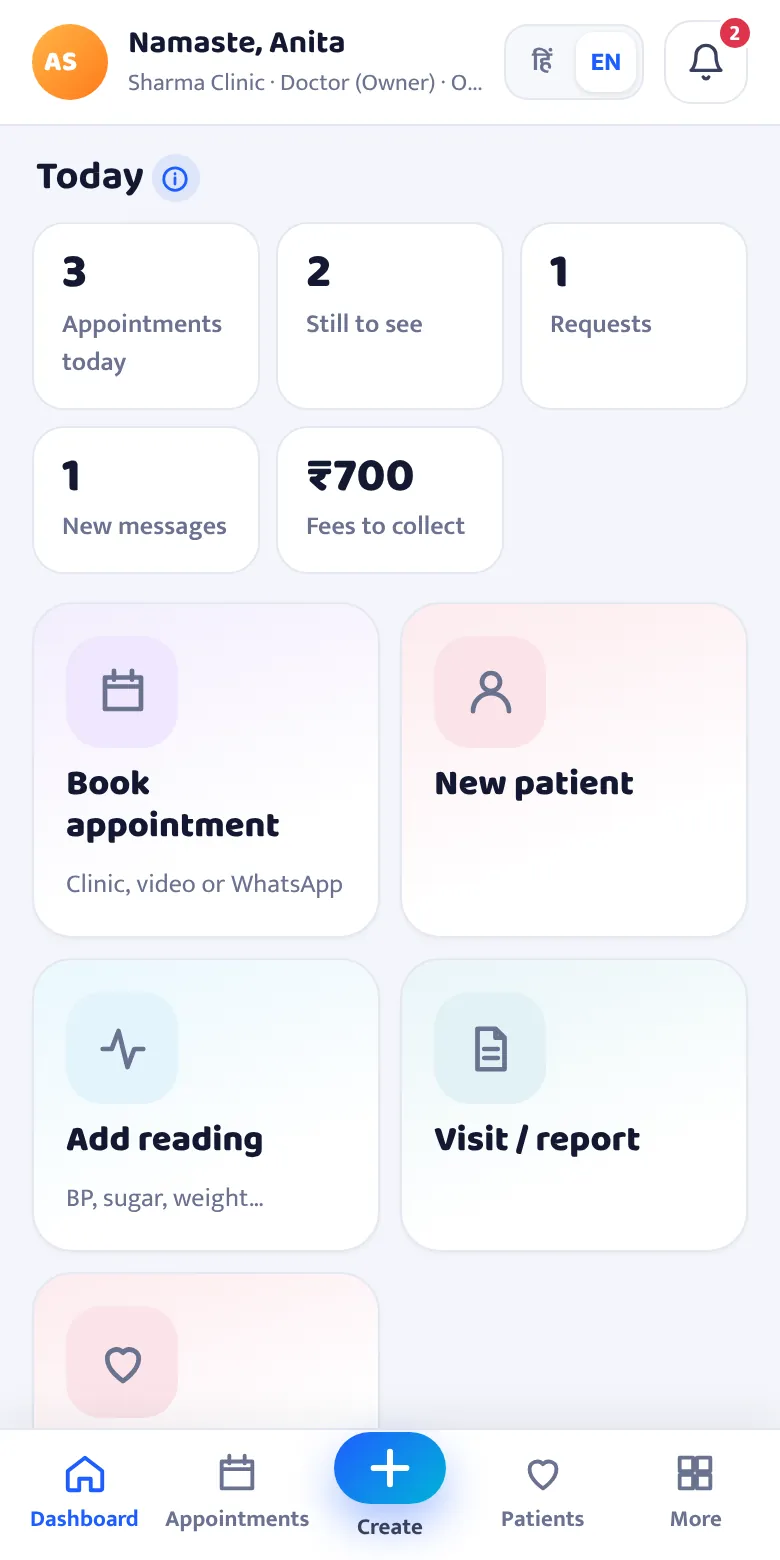
Everything a clinic needs, nothing extra
Sign up as a clinic and the app opens with only the doctor’s sections.
Patient records, date-wise
Every visit with problem, diagnosis, medicines, reports and photos. Print a clean prescription with your registration number.
BP, sugar & weight charts
Readings from the clinic and from home show as charts and as a table, with the change since the first visit.
Patients send readings from home
Each patient gets a private link. No app, no login. Big buttons in Hindi or English.
Photos and voice notes
Patients show a rash or a report with a photo, or simply speak their problem. You reply the same way.
Appointments & online consultation
Clinic visit, video call or WhatsApp call. Patients request a time; you confirm in one tap and send a reminder.
Fees by UPI, with reminders
Patients pay straight to your UPI. No fee is cut. Send a polite WhatsApp reminder for pending fees.
Alerts for readings to check
When a patient sends a very high BP or sugar, a message or a request, your phone gets a notification.
Staff see only what you allow
Receptionist: appointments and fees. Nurse: readings. Associate doctor: records. You choose for each person.
Hindi and English
The whole app and the patient’s page switch to Hindi with one tap.
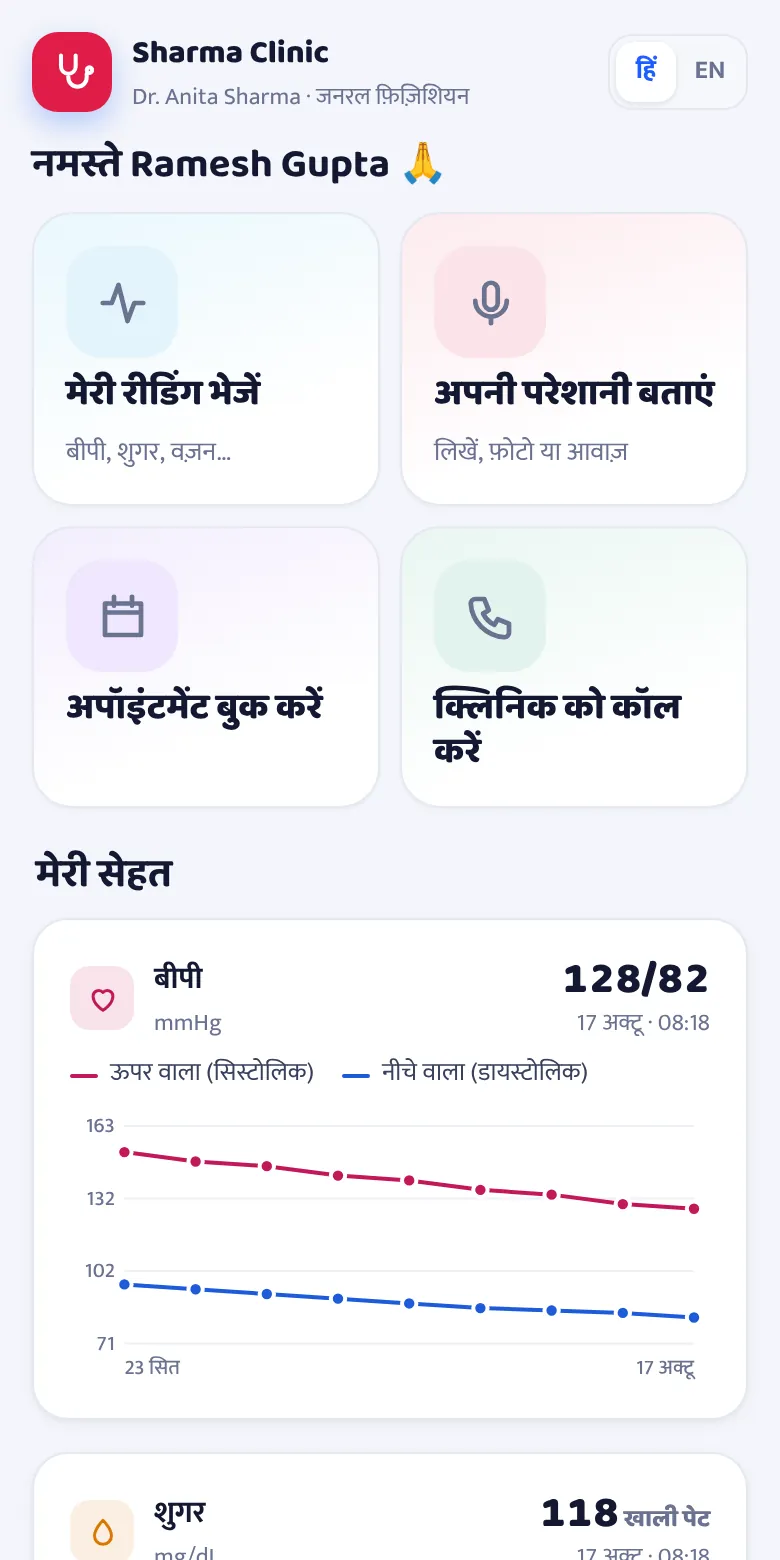
As easy for the patient as WhatsApp
Patients see four big buttons: send reading, tell my problem, book appointment, pay fee. Even elderly patients manage it.
- Consent once, then just tap
- Patients see their own charts and stay motivated
- If a link reaches the wrong person, replace it in one tap
Start in three steps
Sign up as Doctor / Clinic
Add your registration number and certificate. Approval usually within 24 hours.
Set fees, UPI and timings
Add clinic and video fees, your UPI ID, timings and logo once.
Add patients and send their link
Add a name and mobile, send the link on WhatsApp. The rest comes in by itself.
Questions doctors ask
Why do you ask for my registration certificate?
Patients trust the doctors on SabManage, so every clinic is checked once. Upload your medical council registration certificate at sign-up; the clinic opens after approval, usually within 24 hours.
Do patients need to install an app?
No. You send each patient a private link on WhatsApp. It opens in the phone’s browser. The patient agrees once, then sends readings, photos or voice notes and books appointments.
How do video consultations work?
Book a video appointment and the app makes a free Jitsi Meet video room. You and the patient join from the link. You can also choose a WhatsApp call.
Where is patient data kept?
On secure servers in India (Mumbai). Photos, reports and voice notes are private files. Only your clinic’s logins, as you allow, and the patient’s own link can open them.
Does the app give medical advice?
No. It stores and shows records. Coloured numbers are only a quick hint; you decide. The patient page tells patients to call 108 in an emergency.
SabManage is a records and communication tool, not a medical device. Treatment decisions are the doctor’s. Online consultations are the doctor’s responsibility under India’s Telemedicine Practice Guidelines.